


You can also file a report from this portal for numbers that you are not using.
Apke naam pe kitne sim hai kaise pata kare: We easily change the number by taking a new SIM if needed. A total of nine SIMs can be issued to a person in the country in his name. Sometimes we ourselves forget how many sims we have taken. If you do not even remember how many sims have been issued in your name, then you can easily check it. Recently, the Sanchar Sarathi portal has been given this facility by the Government of India.
Let us tell you that a few days ago, the Department of Telecommunications had launched the Sanchar Sarathi portal. Telegram Analytics for Fraud Management and Consumer Protection (TAFCOP) feature has been given in this portal for citizens. From this section, you can easily find out how many sims are running in your name by following some steps.
To see the list of SIMs issued in your name, you have to visit the TAFCOP section of Sanchar Sarathi. From here you can also file a report of those SIM or numbers which you do not use.
How to check active sim of your name
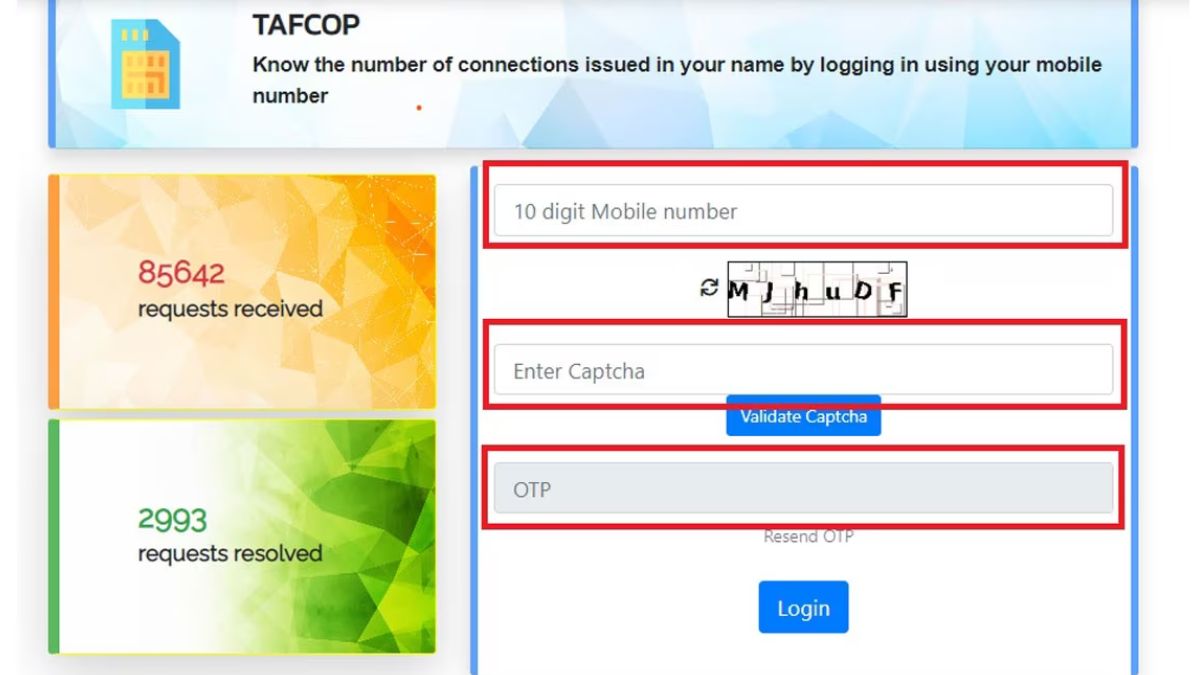
- First of all go to TAFCOP section after going to Sanchar Sarathi portal
- Enter your mobile number when the new page opens.
- Now fill the captcha on the page, now OTP will be sent to your number.
- Now you have to fill the one time password received on the mobile. Now you will be able to login.
- New page login, the list of those mobile numbers will appear in front of you which are running in your name.
- By selecting the numbers which you are not using, you can also report against them from here.
Be the first to read breaking news in Hindi aajsamacharindia.com| Today’s latest news, live news updates, read most reliable Hindi news website aajsamacharindia.com|
Like us on Facebook or follow us on Twitter for breaking news and live news updates.